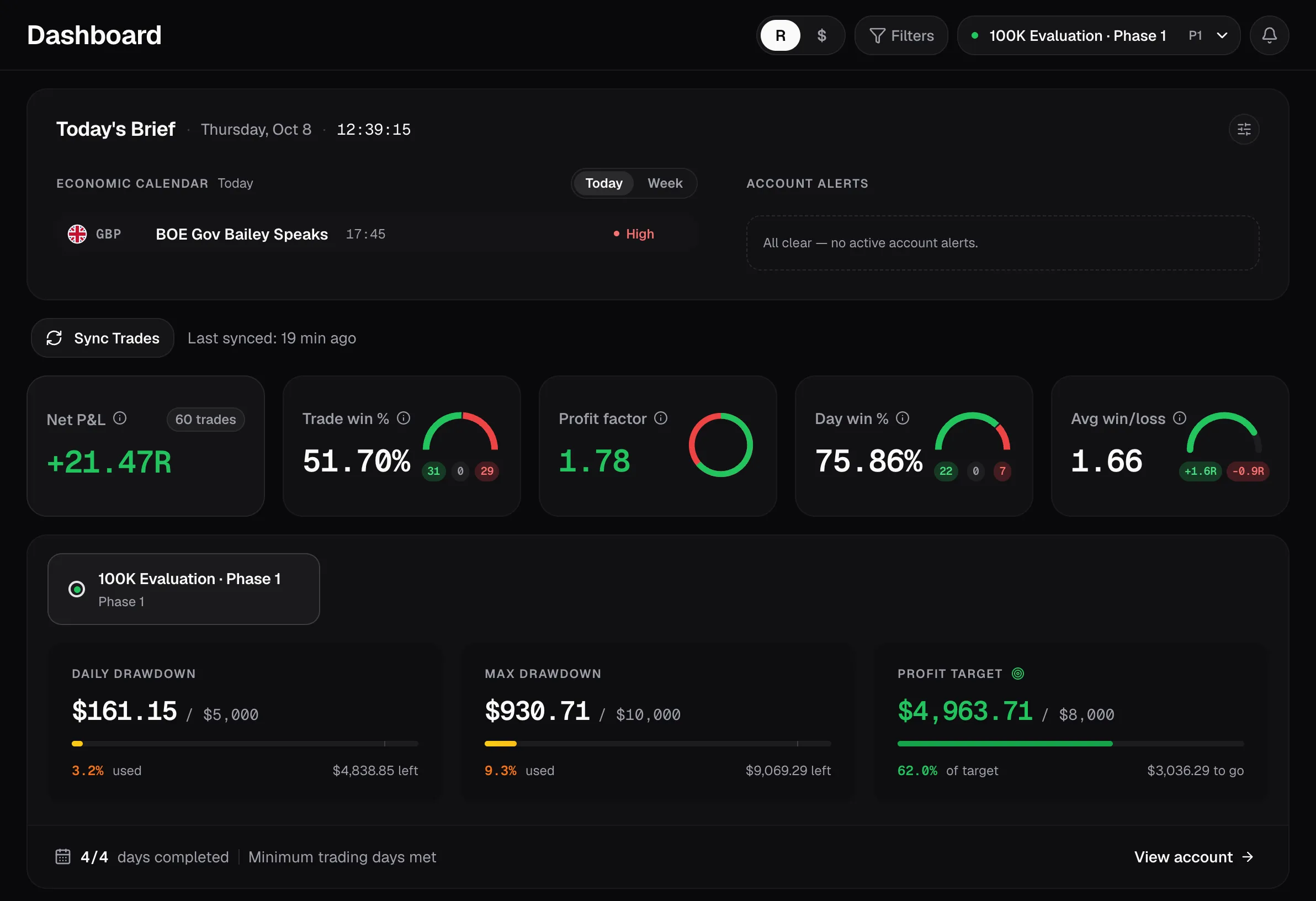
PropVexis is an R-based trading journal with prop-firm challenge tracking baked in. Auto Sync your trades from MT5, cTrader and TradeLocker, watch your drawdown headroom, and know exactly where you stand — before you breach.
Auto SyncMT5, cTrader & TradeLocker — no terminal running
GFT · FTMOprop-firm rule templates
Early warningalerts as you near a rule, not after
Everything in one place
Three tools. One workflow.
From the trade you just closed to the challenge you’re trying to pass — PropVexis follows the whole loop.
Journal
A journal that speaks R, not just dollars
Auto Sync from MT5, cTrader or TradeLocker, import a CSV, or log trades by hand. Every trade is scored in R and money, with pips, fixed-R and MFE — and trade replay so you can review exactly what happened.
Auto Sync · CSV · manual
R-based dashboard, calendar & analytics
Tags, notes, and candle-by-candle replay
Recent trades+42.6R
XAUUSDbuy · 0.40+2.1R
EURUSDsell · 1.00−1.0R
GBPJPYbuy · 0.25+3.4R
US100sell · 0.50+0.8R
Prop OS
Know your prop-firm rules cold
Prop OS tracks each challenge: profit target, max & daily drawdown, minimum trading days, and payout splits. Firm templates pre-fill the rules, and alerts warn you before a breach — not after.
Drawdown headroom, updated every sync
Challenge finance & ROI tracking
GoatFundedTrader & FTMO templates
Breach & proximity alerts
Challenge · Phase 1Day 7 / 10
Profit target68%
Max drawdown used31%
Daily drawdown used76%
Daily loss limit — $310 of headroom left
Reports
One report that ties it all together
Composed Journal + Prop + payout reports you can print to PDF or export to CSV — for your own review, your prop firm, or your accountant.
Journal + Prop + payouts in one view
Print-ready PDF & CSV export
One account or several at once
July reportPDF · CSV
Net R+18.2RWin rate61%Payouts$2,400
How it works
Set up in minutes. Useful from the first trade.
No spreadsheet template to maintain, no formulas to fix. Four steps, and the last one is the only one you repeat.
01
Get your trades in
Connect your MT5, cTrader or TradeLocker account once and Auto Sync brings closed trades in from our servers — every few hours on its own, or whenever you press Sync. Anything else? Import a CSV or broker statement, or add trades by hand — the analytics are identical either way.
Auto Sync
CSV / statement import
Manual entry
02
Add the context numbers can’t see
Tag the setup, session and pair. Write what you saw and what you’d do again. Replay the trade candle by candle on M1 data, so review isn’t a memory exercise.
Tags & playbooks
Notes per trade
Candle-by-candle replay
03
Track the challenge, not just the P&L
Enter your firm’s rules once — or pick a template — and Prop OS watches them: drawdown headroom, profit target, trading days, payout splits. Alerts fire on approach, not after the breach.
Rule templates
Drawdown headroom
Breach & proximity alerts
04
Review, then repeat
Your dashboard, calendar and analytics are all R-based, so a good week reads the same whether you traded 0.2 lots or 2. Export a report when your firm, your coach or your accountant asks.
R-based dashboard
Calendar & day view
PDF & CSV reports
In the box
Everything a prop trader keeps reaching for
Built one feature at a time against a live funded account — so what’s here is what actually gets used, not a feature list written to fill a page.
R-based analytics
Every metric in R as well as money, so a 0.2-lot week and a 2-lot week compare honestly. Expectancy, profit factor, win rate, average win/loss.
Calendar & day view
A month grid coloured by daily result, and a day view that reconstructs a single session trade by trade.
Trade replay
M1 candles played back around your entry and exit — see the trade you actually took, not the one you remember.
Prop rule engine
Daily and max drawdown, profit target, minimum trading days, consistency — tracked per challenge, with headroom shown in money and R.
Payout tracker
Log or auto-detect withdrawals from funded accounts, with your split applied, and see them marked on the equity curve.
Alerts that arrive early
In-app alerts on rule breaches, on approaching a limit, and on milestones — so the warning lands while you can still act on it.
Reports & exports
Journal, prop and payout data composed into one print-ready report, or exported to CSV for your own analysis.
Multi-account view
Run several accounts and firms side by side, or switch to a portfolio view that aggregates all of them in R.
Filters & screener
Slice any view by pair, session, setup, direction, R range, date and more — then read the same metrics for just that slice.
Why not a spreadsheet
The sheet works until the challenge starts
Most funded traders are journaling in a spreadsheet right now. It’s fine for a trade log. It’s the rule-tracking, the review and the upkeep that break down.
SpreadsheetPropVexis
Getting trades inCopy-paste after every sessionAuto Sync from MT5, cTrader, TradeLocker — or CSV / manual
R-multiplesA formula you maintain by handComputed per trade, everywhere in the app
Prop-firm rulesTracked in your headPer-challenge engine with firm templates
Drawdown headroomRecalculated when you rememberIn money and R, on every page, after every sync
Breach warningsNone — you find out afterAlerts on approach and on breach
Trade reviewScreenshots, if you took themCandle-by-candle replay of every trade
Payouts & feesA second sheet, out of dateTracked with your split, on the curve
ReportingManual formattingOne report, print-ready or CSV
Connections
Wherever your trades already live
MT5, cTrader and TradeLocker sync themselves with Auto Sync — connect once, nothing left running on your PC. Everything else imports from a statement — and if your platform isn’t here yet, manual entry gives you the same analytics from day one.
MetaTrader 5Auto Sync, in the cloud
cTraderAuto Sync, in the cloud
TradeLockerAuto Sync, in the cloud
CSV & statementsAny broker, any history
Manual entryNo platform needed
Pricing
Free while we’re in early access.
Everything PropVexis does today is included — Auto Sync, Prop OS, replay and reports. No card to start, no trial countdown.
Still curious? Email us and we’ll help you get set up.
What is PropVexis?
An R-based trading journal built for prop-firm and funded traders. It pulls in your closed trades from MT5, cTrader and TradeLocker, tracks your prop-firm challenge rules (drawdown, profit target, trading days), and shows you analytics in R and dollars.
How do my trades get in?
Connect your MT5, cTrader or TradeLocker account once and Auto Sync brings your closed trades in from our servers — every 3 hours on its own, or when you press Sync (up to every 15 minutes). No terminal has to be running. Any other platform: import a CSV / broker statement, or add trades by hand.
Is it safe to give you my broker login?
We ask for the least each platform allows. MT5: your investor password, which is read-only — a password that can place trades is rejected and deleted on the first login. cTrader: you authorise us on cTrader’s own site with view-only access, so we never see your password. TradeLocker has no read-only password, so we tell you that before you connect and ask you to agree. Stored credentials are encrypted (AES-256) and used only to read your trade history; disconnecting an account deletes its password.
Does it track prop-firm rules?
Yes — that’s the point. Prop OS tracks your challenge finances, ROI progression, drawdown headroom, minimum trading days, and warns you as you approach a rule, not after you breach it. Templates for firms like GoatFundedTrader and FTMO pre-fill the rules.
Is my data private?
Your data is isolated per user and never shared or sold. Sign in with Google or with an email and password — either way the session is a signed, httpOnly cookie, and we store only what you journal. You can export your reports as CSV or PDF, and if you want your account and data deleted, email privacy@propvexis.com and we delete it.
Do I need to install anything?
No. The app runs in your browser and Auto Sync runs on our servers, so nothing has to be installed or left running.
Which prop firms does it work with?
Any of them — the rules are configurable, so you can enter the profit target, drawdown type, daily limit, minimum trading days and payout split for whichever firm you trade. GoatFundedTrader and FTMO ship as one-click templates, and more are being added.
Does it work if I trade my own capital?
Yes. The journal, R-based analytics, calendar, replay and reports are all independent of prop firms — Prop OS simply stays empty until you add a challenge.
What does it cost? Can I cancel anytime?
It’s free during early access — every feature, no card. There’s no billing yet, so there’s nothing to cancel. Pricing will be announced before billing starts.
Stop guessing. Start journaling.
Set up your first account in under two minutes. Free during early access — every feature, every account, no card.